Anova Culinary
- 3.2
- Rating
- 1.00M
- Installs
- Free
- Price

 Analysis by App-foxy
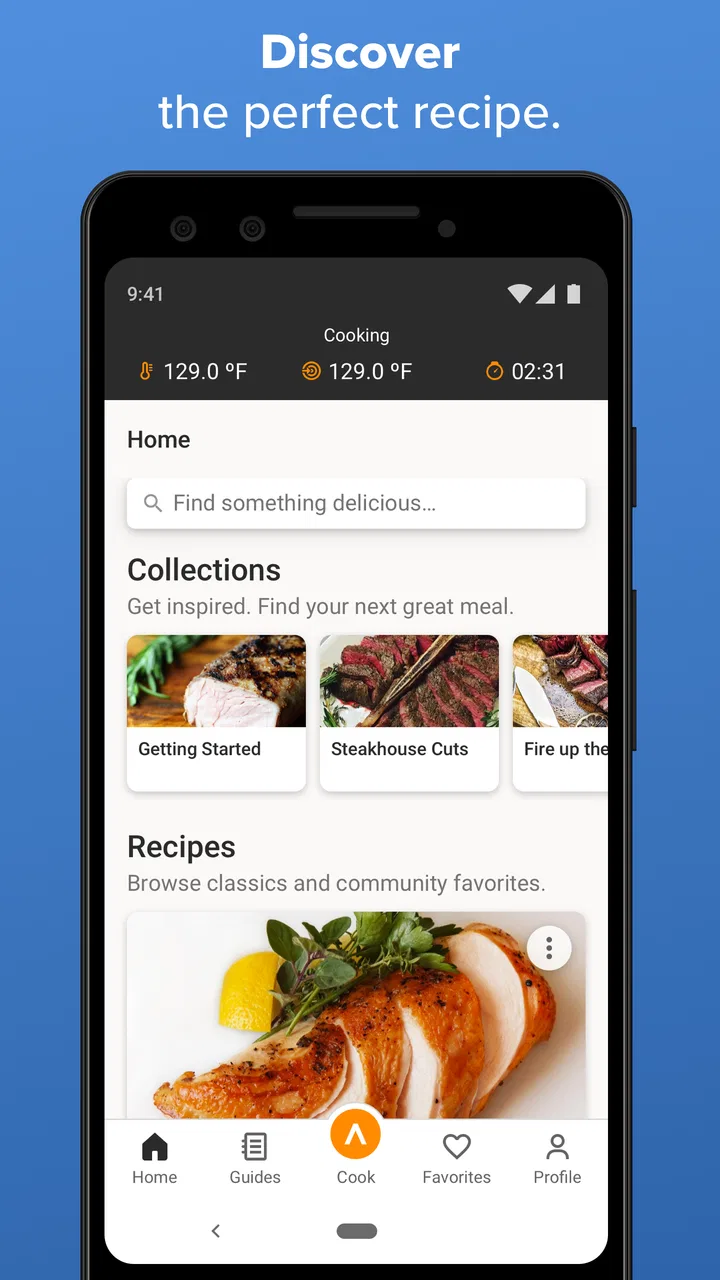
I spend a lot of time deciding whether a cooking app is genuinely useful or merely a collection of attractive food photos. Anova Culinary earns attention because it is built around sous vide cooking, a method that benefits from clear timing, temperature guidance, and a little reassurance when you are still learning. I found it most valuable as a companion to an Anova cooking setup, but it can also help anyone researching the technique before buying equipment.
This is a free Food & Drink app from Anova Applied Electronics, Inc., with recipes and guides at its core. It is available to Everyone, has passed one million installs, and carries an average rating of 3.3 from around twenty-eight thousand ratings. Those numbers suggest a widely used app with a mixed experience rather than an automatic recommendation. My impression is similar: the cooking material can be practical, while the overall app experience deserves a careful look before you make it part of your kitchen routine.
What the app feels like in everyday cooking
The main appeal is that sous vide preparation is unusually dependent on process. With a pan, I can adjust heat by sight and sound. With sous vide, I need to think about water temperature, thickness, timing, seasoning, finishing, and food safety. A recipe guide can turn that chain of decisions into something easier to follow, especially when I am cooking a cut I do not prepare often.
You May Also Like

 Blood Strike: 2.5 Anniversary
Blood Strike’s Loadouts Turn Every Drop Into a Tactical Gamble
A close look at Blood Strike’s custom loadouts: how fast access to signature weapons reshapes its battle royale rhythm, rewards preparation, and narrows the gap between fights.

 Pandora - Music & Podcasts
Pandora’s Music Is Easy to Start, but Harder to Recover
Pandora’s strength is its low-effort path from a seed to a station. Its weak spot is how much confidence it asks you to place in connection, setup, and quiet recovery.

 8 Ball Pool
 Is Built on Rivalries, Rematches, and Routine
A close look at the rivalries, rematches, shared routines, and unanswered safety questions that turn a quick pool match into a persistent mobile community.

 Samsung Music
’s Quiet Strength Is Playing What You Already Own
Its reach comes less from spectacle than from dependable access to a personal library. That simplicity is both the app’s strongest retention engine and its ceiling.

 AccuWeather: Weather Radar
AccuWeather Review: A Quick, Clear Forecast for Everyday Decisions
For everyday plans, the best forecast is the one you can understand quickly. AccuWeather makes rain timing, radar, and local conditions easy to act on, with a few trade-offs.

 Hill Climb Racing
Why Hill Climb Racing Still Turns Crashes Into One More Run
A tiny car, a bumpy hill and one more upgrade: Hill Climb Racing keeps resurfacing because its simple chaos makes every near-miss feel personal.
More From Our News Desk



I would use the app on a weekend when I have time to prepare a meal in advance. For example, I might choose a steak or another protein, read the recommended approach, prepare the bag, and let the water bath handle the slow part while I make side dishes. The useful shift is not simply “follow a recipe.” It is learning which steps happen before the bath, which ones happen after it, and where texture depends on the final sear.
That makes the app different from a normal recipe collection. A general cooking app may tell me how to make a sauce or roast a chicken, but sous vide instructions need to explain a controlled water bath and the finishing stage. When the guidance is clear, I feel less tempted to keep opening unrelated searches while my food is cooking.
The app is not a substitute for judgment, though. A recipe screen cannot inspect the thickness of my food, the condition of my ingredients, or how cleanly I handled them. I still need to use sensible food-safety practices and understand that a suggested time is not a universal answer for every portion. This is one of the first trust points for me: useful guidance should support decisions, not encourage blind automation.
Where the recipe format helps most
I found the strongest use case in repeatable meals. If I want to prepare the same type of dinner more than once, a dedicated guide gives me a reference point instead of forcing me to reconstruct the process from memory. It is also helpful when I am moving from beginner recipes toward more deliberate cooking, because sous vide often exposes details that ordinary recipes leave vague.
Another practical use is planning around a busy evening. I can do the preparation earlier, let the cooking stage run while I handle other tasks, and return for the finishing work. That does not make the meal completely hands-off; the final browning still matters, and timing the side dishes remains my responsibility. Still, the app can make the long middle stage easier to organize.
I would be more cautious about using it for an improvised meal when I have no time to read. Sous vide is not always the fastest route from raw ingredients to dinner. If I need food immediately, a skillet, pressure cooker, or conventional oven may be more sensible. The app is at its best when I value consistency and planning rather than speed.
Trust starts with knowing what I am actually using
The developer is clearly identified as Anova Applied Electronics, Inc., and the app has been available since April 28, 2015. Its current version is 3.5.13, and it supports Android 7.0 or later. That long presence gives me useful context, but it does not remove the need to inspect the current experience. Older apps can accumulate changes over time, and a familiar brand name is not the same thing as a guarantee that every screen will suit every user.
The app is free to install, with in-app purchases ranging from $1.99 to $9.99 per item. I would therefore begin by exploring the free experience rather than assuming every guide or convenience is included. The distinction matters for a cooking companion: if I am only testing sous vide, unexpected paid elements could affect whether the app is worthwhile to me.
I also pay attention to how clearly the app presents choices. A recipe service should make it obvious when I am reading instructions, when I am being invited to create an account, and when a feature has a cost. Clear labels build more trust than a polished interface alone. I would not treat the install count or the rating as proof that the app handles my information in a way I prefer; those figures describe popularity and opinion, not privacy.
Controls, permissions, and the moments that deserve attention
When I review an app through a trust lens, I separate visible controls from assumptions. I do not assume that a cooking app is harmless simply because it deals with recipes, and I do not assume that it is intrusive without checking its actual prompts and settings. The important question is whether I can understand what I am being asked to do and make a meaningful choice.
Before using an account-based feature, I would look for the app’s sign-in options, account settings, and any way to manage saved content. I would also read the privacy information presented by the app and the relevant store page before entering personal details. Those steps are not dramatic, but they are the most reliable way to know what choices are available rather than guessing from the app’s category.
Cooking creates a few data-sensitive moments that are easy to overlook. A recipe app may become part of my daily routine, which means I could spend more time signed in than I expected. I might also save preferences, interact with connected cooking equipment, or receive notifications. Each of those situations deserves a quick check of the permissions and controls shown on my device and inside the app.
I would grant only the access that matches a feature I intend to use. If a function needs a particular permission, I want the reason to be understandable at the moment it is requested. If I am only browsing recipes, I would avoid enabling unrelated access simply because the prompt appears during setup. This is not a criticism of a specific permission; it is a practical rule for keeping control of any app.
Account choices are part of the cooking experience
A recipe library becomes more convenient when I can return to dishes I like, but convenience can also make an account feel necessary before I have decided whether the app suits me. I prefer to explore the basic interface first, then decide whether saving, syncing, or other account-linked functions justify registration. That approach keeps the initial commitment small.
If I create an account, I would use a password that is not reused elsewhere and would check the account area for available controls. I would look for ways to update details, manage notifications, and sign out on shared devices. These are simple actions, but they matter in a kitchen where a tablet or phone may be used by several people.
I would also be careful with notification choices. Reminders can be useful when I have started a long cook, but too many alerts can turn a helpful guide into background noise. My preferred setup is to allow only the messages that help with a planned meal, then revisit the setting after a week. If I stop using the app, I would remove it from devices I no longer need and review any account relationship separately.
The same principle applies to connected cooking workflows. If I use the app with compatible Anova equipment, I want to know which actions are being controlled from the phone and which still require physical attention. I would not leave a cooking process unattended merely because an app offers a remote or guided step. Digital control can reduce effort, but it does not replace checking the water level, the bag, the equipment, or the food.
Three practical habits that improve the experience
- Read the complete recipe before starting. I check the preparation, bath stage, finishing instructions, and any resting time first. This prevents the common mistake of reaching the end of the cook and discovering that the final sear or sauce needs more preparation than expected.
- Use the app as a reference, not a measurement substitute. I compare the guidance with the actual thickness and portion in front of me. A timer cannot account for every variation, so I treat the recipe as a starting framework rather than an unquestionable command.
- Separate browsing from commitment. I explore recipes and visible settings before signing in or paying for anything. This lets me judge whether the free material, account requirements, and optional purchases fit my habits.
These habits also reveal a trade-off. The app can reduce uncertainty for a beginner, but it may encourage a false sense of precision if I never learn why the instructions work. I get more value when I use each recipe to build understanding: how thickness affects time, why a finishing pan matters, and which parts of the meal can be prepared ahead.
Who should use it, and who should skip it
I would recommend trying it to someone who owns Anova equipment, wants a structured way into sous vide, or enjoys preparing meals in advance. It is also suitable for a curious home cook who wants cooking guides focused on this particular method rather than a broad catalog of unrelated dishes.
I would be less enthusiastic for someone who wants a general meal planner, a large collection of conventional recipes, or an entirely offline cookbook. The app’s identity is tied to sous vide, so it is not the best choice if I mainly cook with a frying pan, oven, or pressure cooker and do not plan to change that. A general recipe app may offer better variety for that person.
I would also skip it if I dislike account decisions, optional purchases, or app-based kitchen routines. A printed recipe and a reliable thermometer can be a better fit for someone who wants fewer digital layers. Likewise, if my phone is old, I would check compatibility before planning around it, since the Android requirement begins at version 7.0.
How it compares with ordinary alternatives
Compared with searching the web recipe by recipe, a dedicated Anova companion feels more focused. I spend less time filtering advice that was written for a different appliance or cooking method. The drawback is that a focused ecosystem can feel narrower, and I may still need another source when I want broader culinary context or a different technique.
Compared with a paper cookbook, the app is easier to update and carry around, but it depends on a functioning device and a comfortable screen. Paper is calmer when my hands are wet or my phone is needed for something else. The app wins when I want guided discovery and saved digital material; paper wins when I want simplicity and no notifications.
Compared with a smart-appliance control app alone, the recipe-and-guide approach is more useful for learning. Equipment controls can start or monitor a process, but they do not automatically teach me how to finish the food well. I still value the app more when its instructions improve my cooking decisions, not merely when they operate a device.
My cautious verdict
My overall view is positive but measured. Anova Culinary makes sense as a specialized sous vide companion, particularly for people who want structured guidance and repeatable workflows. The recipe focus gives it a clearer purpose than a generic food app, and the best value appears when I plan meals ahead rather than chase instant dinner solutions.
Trust, however, comes from my own choices inside the app. I would review permissions, read privacy and account information, control notifications, and delay optional purchases until I had tested the free experience. I would also keep safety decisions in my hands instead of treating a digital guide as an authority that removes responsibility.
The mixed 3.3 average is a useful reminder to keep expectations realistic. This is not a universal kitchen solution, and it is not automatically better than a cookbook, a general recipe service, or a simpler cooking method. For the right user, though, it can turn sous vide from an intimidating experiment into a repeatable part of the week. I would try it when I wanted that focused support, while keeping my account, device permissions, and cooking judgment firmly under my control.
FAQs for Anova Culinary
01What is the Anova Culinary app used for?
The Anova Culinary app is designed to help users perfect their sous vide cooking. It offers step-by-step guides, a wide range of recipes, and the ability to control your Anova Precision Cooker remotely. Whether you are a novice or an experienced cook, this app simplifies sous vide cooking and enhances your culinary experience.
02Is the Anova Culinary app compatible with all devices?
The Anova Culinary app is available for both Android and iOS devices. However, ensure your device meets the minimum operating system requirements to run the app smoothly. Compatibility with certain features may also depend on the model of your Anova Precision Cooker, so check for specific device requirements.
03Does the Anova Culinary app require an internet connection?
An internet connection is required for downloading the app, accessing new recipes, and receiving updates. However, once recipes are downloaded, you can use the app offline. Keep in mind that features like remote cooking control require a stable internet connection to function properly.
04Are there any subscription fees for using the Anova Culinary app?
The Anova Culinary app is free to download and use. It provides a range of free recipes and cooking guides. There are no subscription fees associated with the app itself, though additional premium content or features may be available for purchase within the app.
05How can I troubleshoot connectivity issues with the Anova Culinary app?
If you're experiencing connectivity issues, first ensure your Anova device is properly paired with the app via Bluetooth or Wi-Fi. Restart the app and your device, and check for any available updates. If problems persist, consult the app’s support section or contact customer service for further assistance.
Pros
- User-friendly interface for easy navigation.
- Wide range of recipes for various cuisines.
- Precision cooking with adjustable settings.
- Remote control via Bluetooth or Wi-Fi.
- Consistent updates with new features.
Cons
- Requires internet for full functionality.
- Limited compatibility with older devices.
- Initial setup can be a bit complex.
- Some recipes require in-app purchases.
- Bluetooth connection occasionally drops.

Anova Culinary
Gallery